Hi Timo,
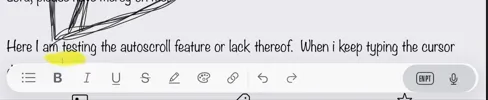
I've noticed what appears to be an issue with the editor on iPad. When writing a long journal entry, once the cursor reaches the bottom of the visible editing area, the editor no longer auto-scrolls to keep the insertion point visible. Instead, the cursor moves underneath the formatting toolbar at the bottom of the screen, so I can no longer see where I'm typing. I have to manually scroll the page to continue writing.
I'm trying to attach a screenshot showing the cursor almost completely hidden behind the formatting toolbar.
Troubleshooting performed:
I tested several input methods to rule out a keyboard-specific issue:
Logitech Keys-To-Go 2 external keyboard
Apple on-screen keyboard
Microsoft SwiftKey
The behavior is identical with all three, so it does not appear to be related to a particular keyboard.
Is this a known issue, or is there a setting I'm missing?
Thanks for a great app!
Diarium version: 3.3.2
OS + version: iPadOS Version 26.5.2
Device model: iPad mini 5th gen
